Draw your way
Freehand for speed, polygon and spline for crisp curved borders, 2D discs and true 3D spheres to paint — or erase — across slices at once.
 RadContour
For iPad · Apple Pencil · iPadOS 26
Stop guessing whether your contours are good. RadContour turns any iPad into a complete radiotherapy training workspace — pull real DICOM studies straight from Files or your PACS, contour with Apple Pencil and thirteen precision tools, and get the same four QA metrics the pros use on every structure, in seconds.
Free on the App Store — Pro plans start with a 7-day free trial. For education, research and technical evaluation — not a medical device.
The app
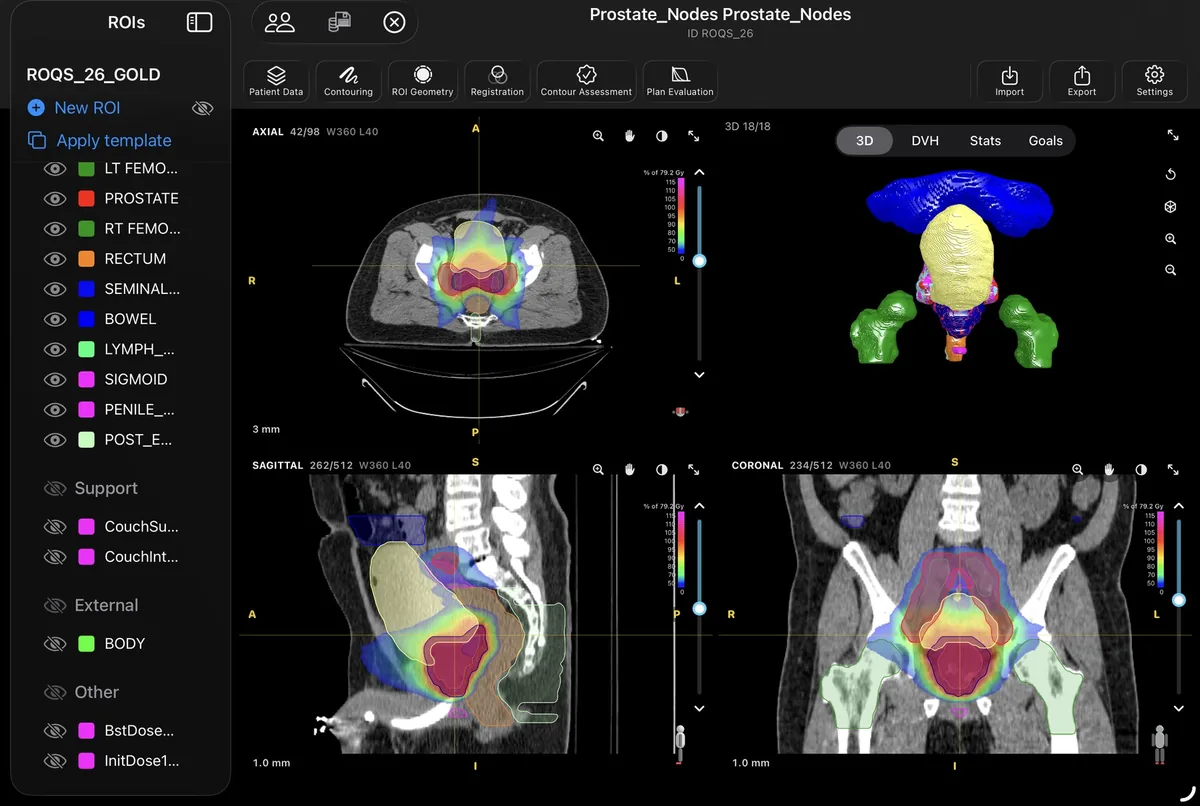
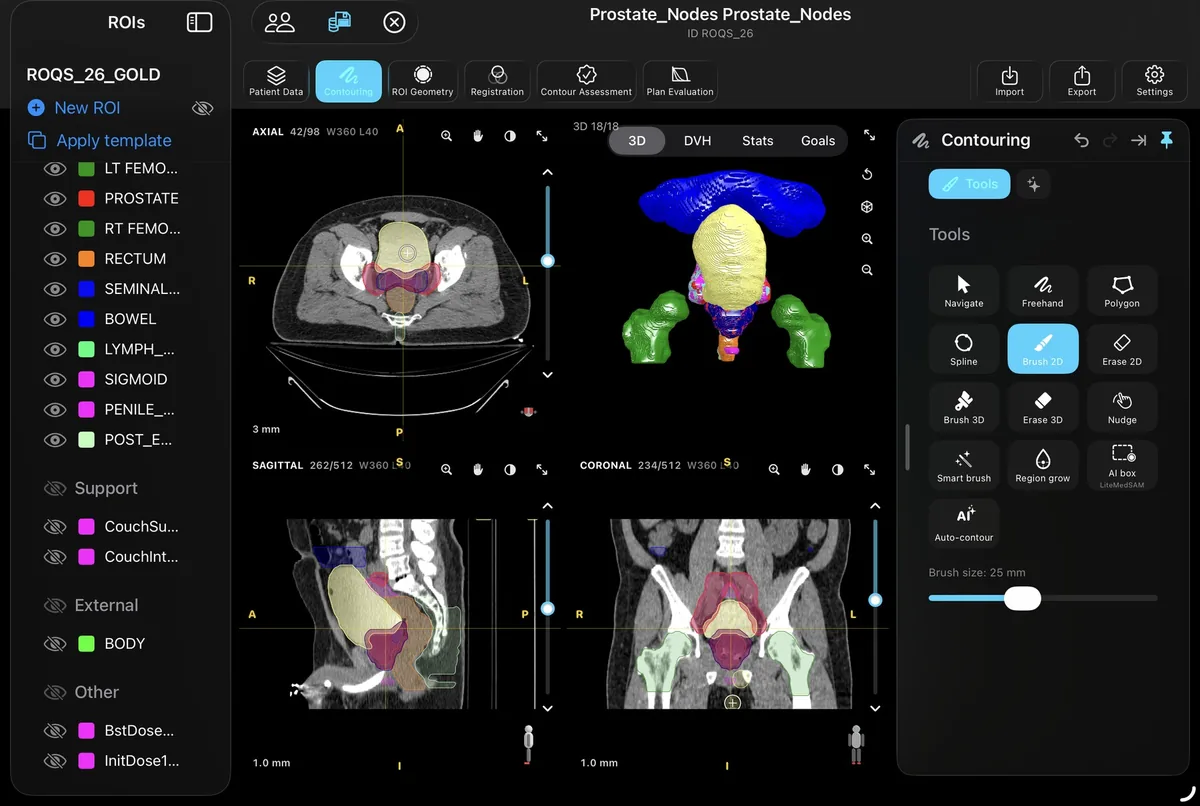
No department workstation, no waiting for a free seat. Structure list, linked axial / sagittal / coronal panes, a live 3D surface view and the full tool palette — everything runs natively on the iPad, wherever you study.
 Structure list & templates
Live 3D surface view
Linked MPR panes
Structure list & templates
Live 3D surface view
Linked MPR panes
Contour
Repetitions build the skill — so the drawing has to feel effortless. Apple Pencil hover previews the brush before it touches down, a pinch resizes it mid-stroke, and undo covers everything. Draw a structure, then overlay the reference and see exactly what you missed.
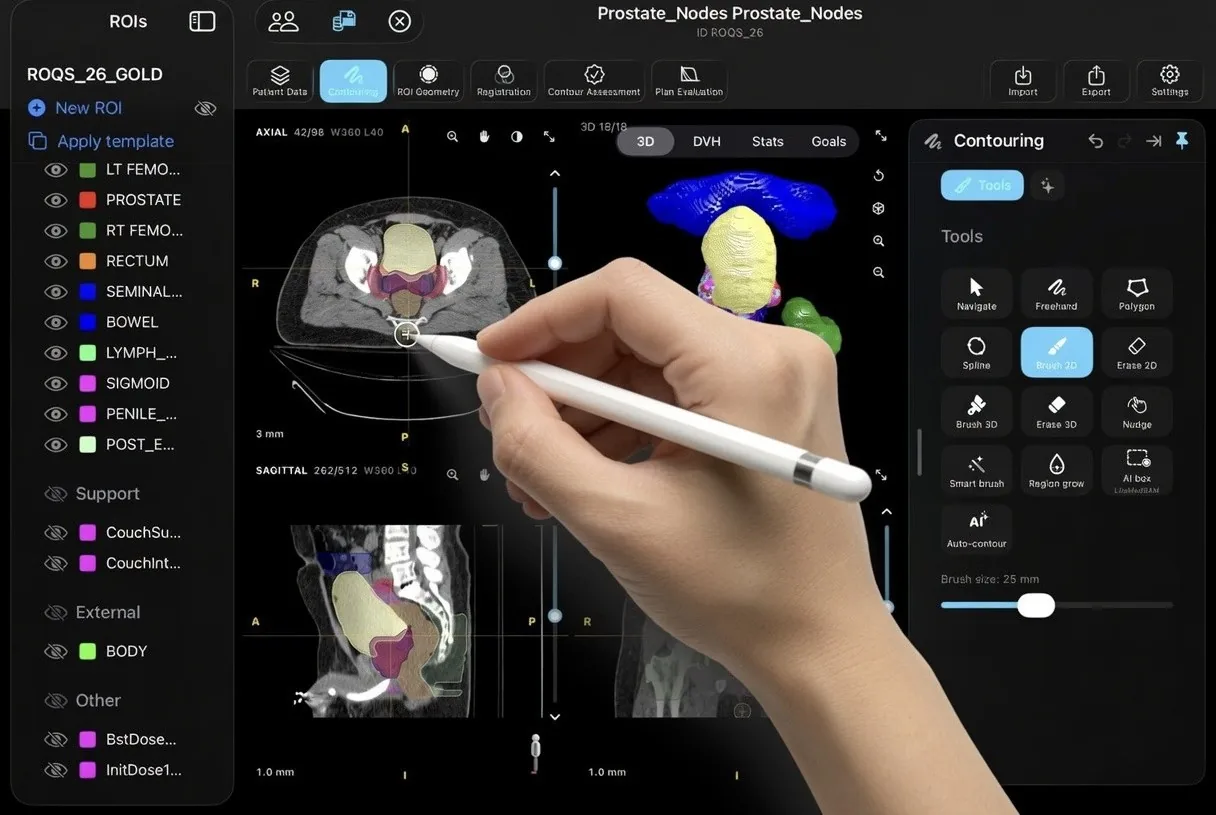
Freehand for speed, polygon and spline for crisp curved borders, 2D discs and true 3D spheres to paint — or erase — across slices at once.
Smart brush paints only tissue within a Hounsfield tolerance of your first touch. Region grow floods a structure from one tap. Nudge sculpts a boundary in or out.
Interpolate between slices, close holes, smooth without losing volume, keep the largest piece — post-processing that turns a rough draft into a defensible contour.
Measure
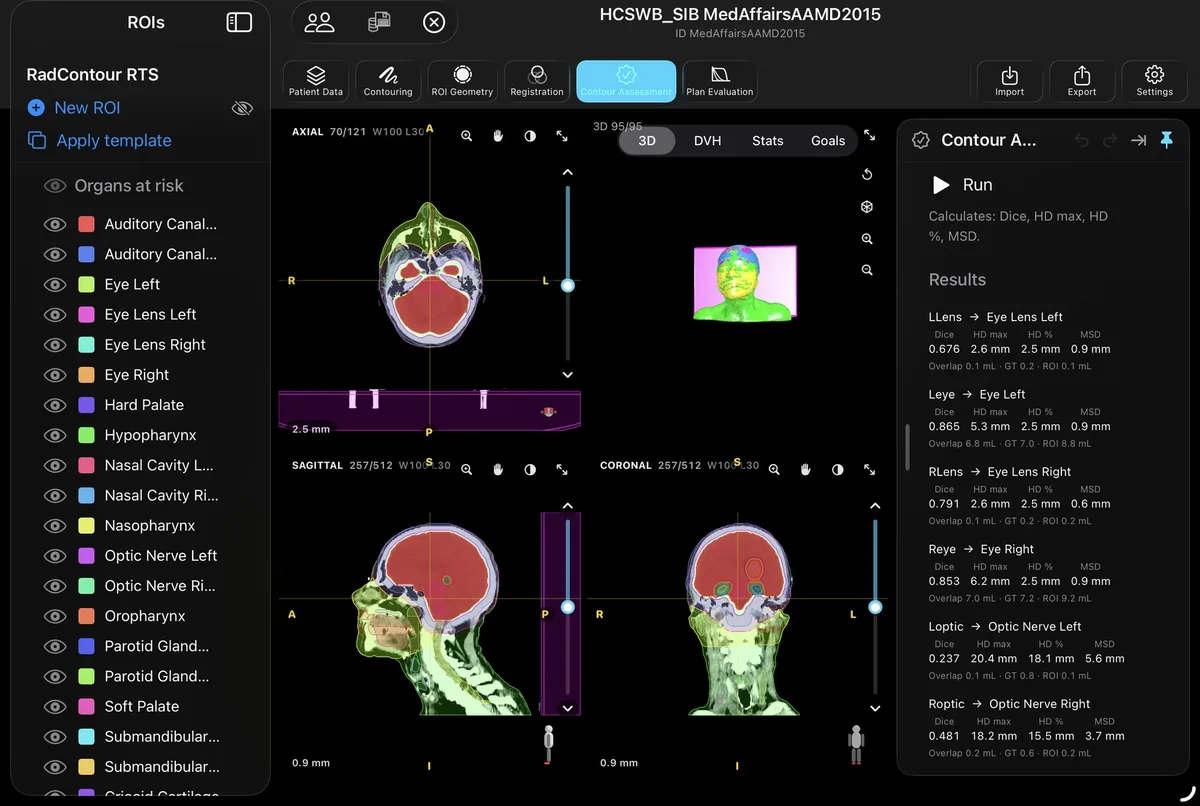
Overlap alone hides boundary errors. Load an expert set as read-only ground truth, and RadContour pairs structures by name, computes the standard QA set side by side, and flags any pair with no shared volume. No letter grade to hide behind — raw metrics, judged in context.
Values shown: left eye, RadContour structure set vs expert ground truth on the head-and-neck case below.
The workflow
RadContour Pro follows the same arc you'd walk at a workstation — import, contour, derive, register, evaluate, export — without ever leaving the iPad. Every stage ships with every plan.
Files, AirDrop and iCloud Drive — or straight from the PACS over DIMSE: query and retrieve studies with C-FIND and C-GET, or let the PACS push them to the iPad's built-in Storage SCP.
On-device TotalSegmentator models — whole-body organs plus task models for head & neck, liver segments, lung vessels and more. One-tap organ presets; every result reviewed by you.
PTV = CTV + margin, uniform or directional. Boolean algebra, density thresholds with live preview, walls, and an automatic External that finds the body outline for you.
Automatic rigid registration on a drawn region, landmark and ROI-based fits, five fusion displays from checkerboard to spy glass — then copy structures through a verified result.
Dose wash or isodose lines, DVH, per-structure statistics and clinical goals — D95, Vdose, Dmax, homogeneity and Paddick conformity — graded pass, marginal or fail. Sum doses across courses.
Spec-compliant RTSTRUCT — plus registration, plan and dose — to a folder or straight back to a server, with one-tap anonymisation on the way out.
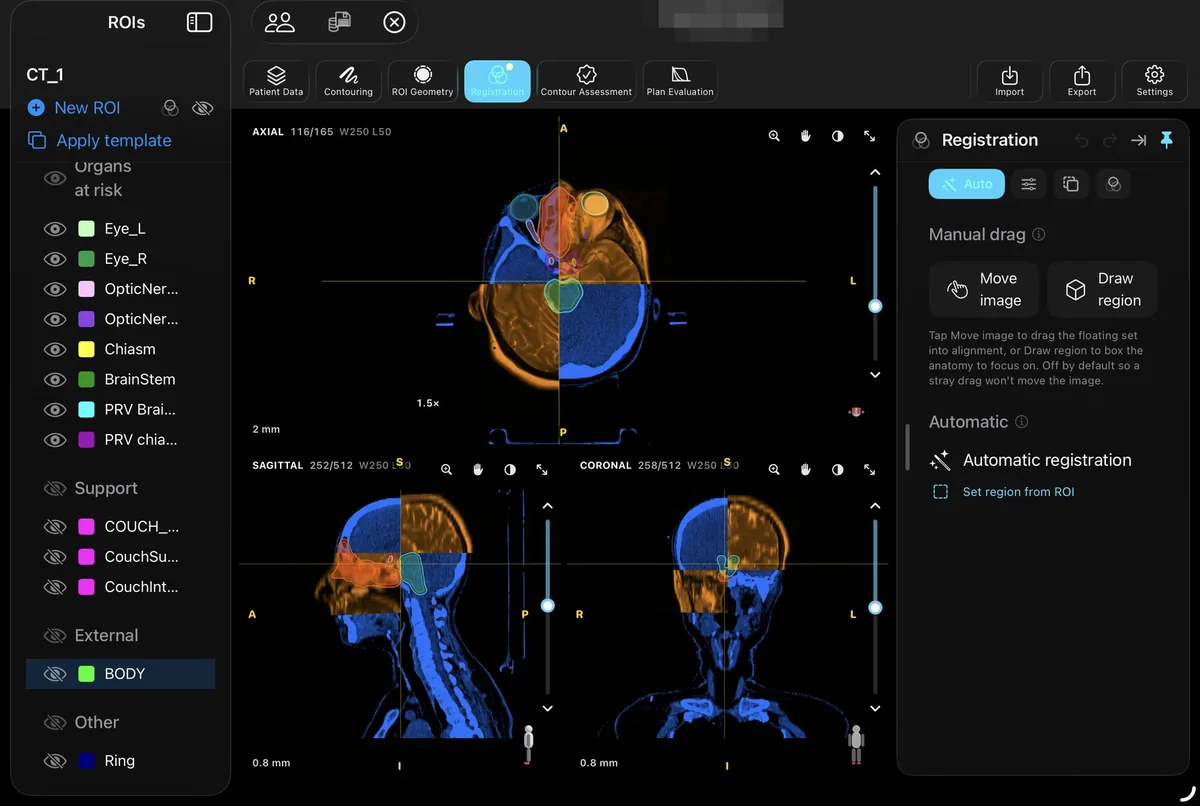
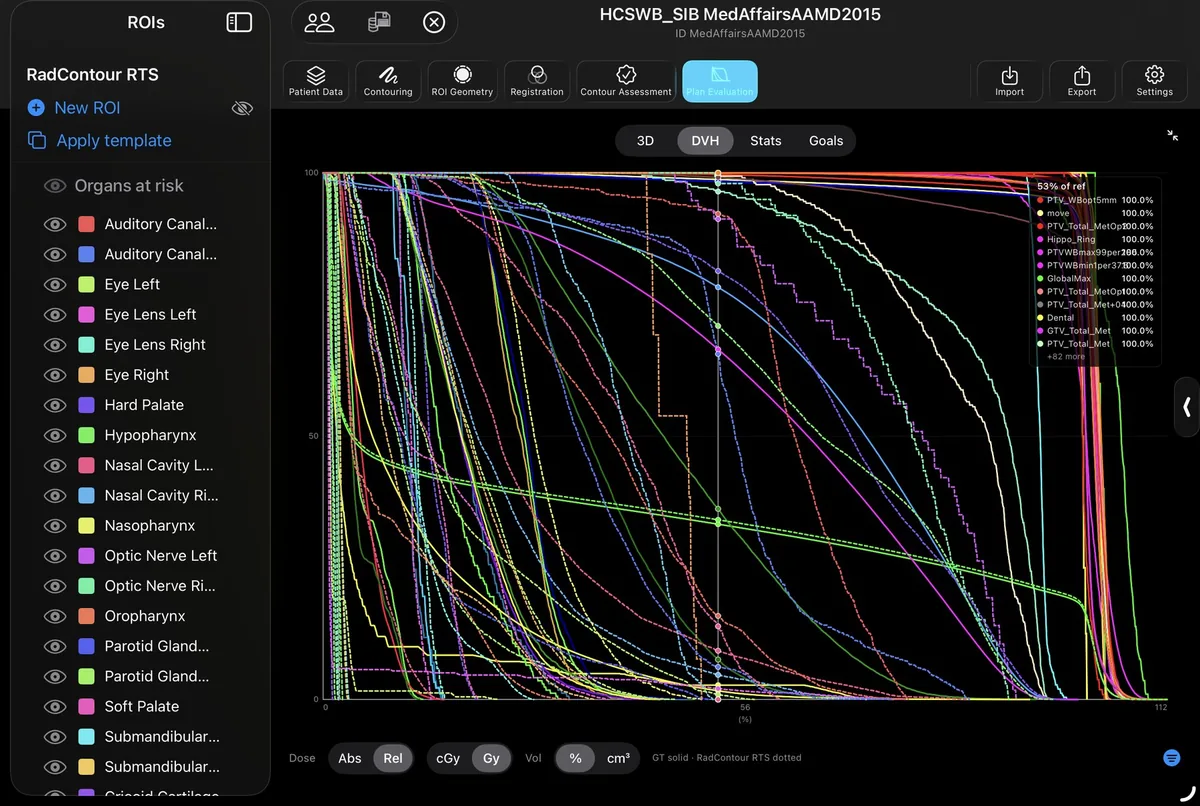
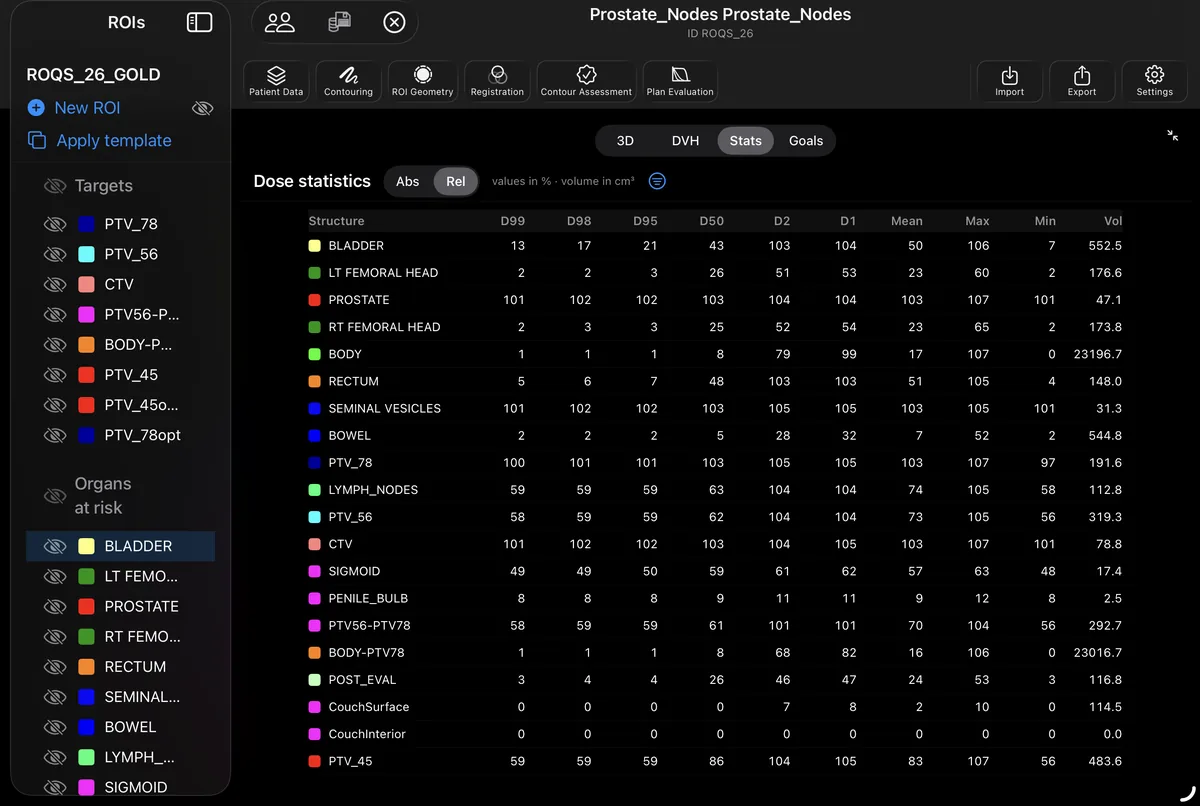
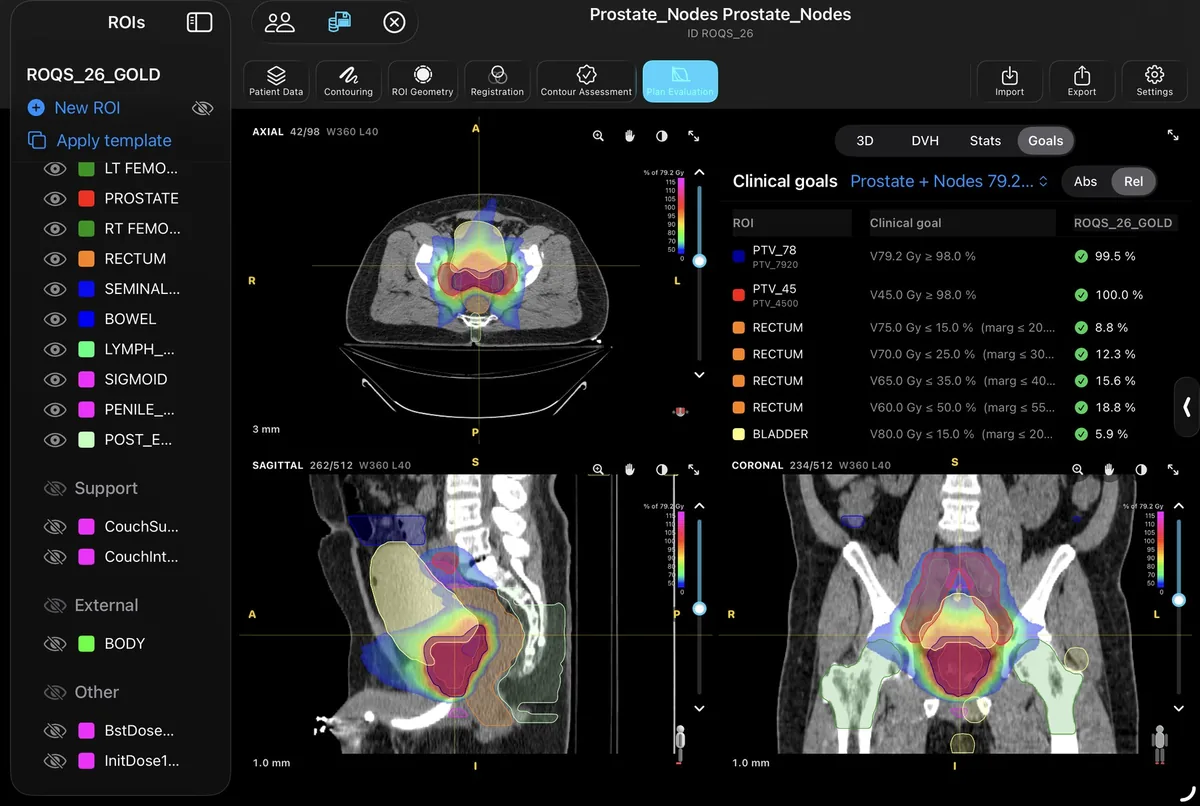
Fusion: two series aligned by automatic or manual rigid registration, blended in complementary colours. DVH: dose–volume histograms for the same plan on two structure sets — ground truth solid, RadContour dotted. Statistics: per-structure dose metrics (D99–D1, mean, max, min) and volume, in absolute or relative units. Goals: per-structure clinical goals evaluated against the dose grid. Patient identifiers redacted.
Who it’s for
One workspace, four kinds of practice — from a first solo contour to a technical evaluation before a department commits.
Radiation oncologists
Contour real DICOM studies, overlay an expert set, and see exactly where your margins drifted — Dice and Hausdorff instead of a second opinion you had to wait for.
Medical physicists
Isodose wash, DVH, per-structure dose statistics and clinical goals graded pass, marginal or fail — plus a documented DICOM conformance surface to test against your PACS.
RTTs & therapists
The full six-stage workflow runs on the iPad in your bag. Repetition is what builds speed, so the drawing has to be available whenever the time is.
Researchers & educators
Load a ground-truth set, score contours structure by structure, and export a spec-compliant RTSTRUCT — with every image processed on-device and one-tap anonymisation on the way out.
Privacy
Studies you load are parsed, rendered, segmented and graded locally — even the AI models run on the iPad's own silicon. RadContour has no analytics backend and uploads nothing to us; the only network traffic is to the DICOM node you configure yourself.
Why an iPad
Departmental workstations are built for planning, not for practice. RadContour is built for the reps — and it goes where you do.
| Department workstation | RadContour on iPad | |
|---|---|---|
| Where you work | The room the licence lives in | Anywhere — ward, train, sofa |
| When you can work | When a seat is free | Whenever you pick it up |
| Feedback on a contour | Whenever a senior has a moment | Four QA metrics in seconds, per structure |
| Where the images go | Across the department network | Stay on the iPad — nothing is uploaded |
| Works offline | Tied to the network | Everything runs on-device, including the AI |
| Getting started | Procurement and scheduling | A free download |
Free and Pro
RadContour is free on the App Store — import up to ten cases, review them in every plane, and contour by hand. RadContour Pro unlocks the AI, the geometry and registration tools, assessment, plan evaluation, DICOM networking and export. Every Pro plan starts with a 7-day free trial.
€0/ forever
€19.99/ month
€14.99/ month
€149.99/ year
| Free | RadContour Pro | |
|---|---|---|
| Cases | Up to 10, imported from Files | Unlimited |
| Review | Axial, sagittal, coronal, 3D and cine | Same, plus dose and DVH views |
| Contouring by hand | Navigate, Freehand, Polygon, Spline, Brush 2D, Erase 2D | All of it, plus 3D brushes, smart brush, region grow and nudge |
| AI auto-contouring | — | TotalSegmentator and MedSAM, on device |
| ROI geometry | — | Margins, Boolean algebra, thresholds, walls, External |
| Registration & fusion | — | Automatic, manual and ROI-guided |
| Contour assessment | — | Dice, Hausdorff and mean surface distance |
| Plan evaluation | — | Dose wash, DVH, dose statistics, clinical goals |
| DICOM networking | — | Query, retrieve and send over DIMSE |
| Export | — | RTSTRUCT, registration and dose, with anonymisation |
| Structure templates | — | Yes |
| Backup | Restore only | Create and restore |
Prices are in euros; Apple shows your local currency at checkout. The 12-month plan bills monthly for a full year (iPadOS 26.4+). Billing is handled entirely by Apple through the App Store. Subscriptions are managed in your Apple Account and can be cancelled at any time.
Questions
Any iPad running iPadOS 26 or later. Apple Pencil is strongly recommended for contouring — the brush previews under Pencil hover before it touches down — but every tool also works with your finger.
Yes. Parsing, rendering, contouring, AI segmentation and assessment all run on the iPad itself — imported cases stay fully usable with no connection at all. You only need a network to talk to a DICOM server.
Nowhere. Studies live in the app's private storage on your iPad, invisible to other apps. RadContour has no analytics backend and sends nothing to us; data only leaves the device when you explicitly export or transfer it. You remain responsible for having the appropriate authorisation for any patient data you import.
No. RadContour is a research, education and training tool. It is not a certified medical device and is not intended for diagnosis, treatment planning, treatment delivery or any patient-care decision. Exported structure sets are marked UNAPPROVED by design, and every automatic result must be reviewed by a qualified professional before any use.
Yes, over classic DIMSE — C-ECHO to verify a node, C-FIND and C-GET to query and retrieve at study level, and C-STORE to send results back. A built-in Storage SCP also accepts studies pushed from the PACS. It needs a node configured together with your IT department and belongs on a hospital-managed network; the DICOM Conformance Statement documents exactly what is supported.
DICOM CT and MR series, RT structure sets, RT plans, RT dose and spatial registrations come in. Out goes a spec-compliant RTSTRUCT — plus registration, plan and dose objects — to a folder or a DICOM server, with one-tap anonymisation on export.
On-device, always. TotalSegmentator models handle whole-organ segmentation and MedSAM-based models power box-prompted suggestions — all inference happens on the iPad's own silicon, nothing is uploaded. Every AI contour is a starting point and must be reviewed against the images before use.
RadContour is free on the App Store — up to 10 cases, review in every plane, and six contouring tools by hand. RadContour Pro adds the AI, ROI geometry, registration, assessment, plan evaluation, DICOM networking and export, with three ways to pay: €19.99 / month, €149.99 / year, or €14.99 / month on a 12-month plan. Each starts with a 7-day free trial, billed through Apple; the 12-month plan runs for a full year.
Import up to ten cases, review them in every plane and contour by hand — free, forever. Pro unlocks the full six-stage workflow, and starts with a 7-day free trial.
1.7 GB download. The segmentation models ship inside the app and run on your iPad — which is exactly why nothing you contour ever leaves the device.
Free to download. Pro from €14.99 / month, with a 7-day trial.